pkgbuild::compile_dll(debug=FALSE, compile_attributes = FALSE)
devtools::load_all()Package organisation
for contributors
How the plant source is laid out, how we develop it (gitflow, testing, CI), how to compile it, and how the R/C++ interface is generated. Aimed at contributors working on the package itself.
Development
Directory structure
The code is organised as follows. This structure reflects the structure generally used for R packages including C++ source.
├── inst
│   ├── RcppR6_classes.yml    # Used by RCppR6 to generate the interface for Rcpp (C++ classes)
│   ├── RcppR6_functions.yml  # Used by RCppR6 to generate the interface for Rcpp (C++ function)
│   ├── include
│   │   ├── plant.h # THE main header file for package - sources other headers
│   │   ├── plant   # header (.h) files for different components, many including implementation
│   │   └── tk      # simple cubic spline interpolation library
│   ├── reference_plant_ff16 # Reference plant physiology ff16
│   ├── docs            # Tables of variables for models
│   └── scripts         # Tools used in package management
├── man                     # R Documentation files (*.Rd)
├── R                           # R functions
├── scripts             # R scripts
├── src                     # C++ files with implementation where not included in headers
├── tests               # Tests
└── vignettes           # Vignettes
Note
The workflow itself — issues and the board, feature branches, what the automated checks do and don’t prove, squash merges, and what a reviewer is looking for — is set out in How we work. This section covers only the parts specific to building this package.
Issues
We use
- github issues for feature requests, bug reports and developer coordination.
- github projects for planning of work, including roadmaps, milestones and sprint planning.
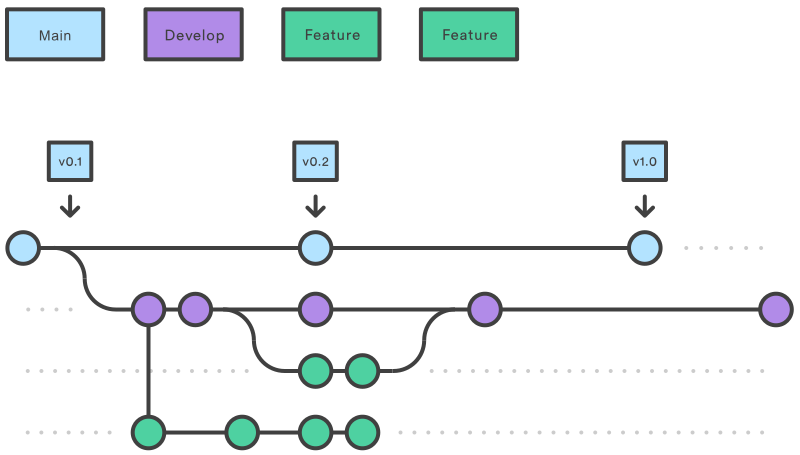
Gitflow workflow
We use the Gitflow workflow.
This means we have at least two main branches always present:
- a master branch (
master) for stable releases - a development branch (
develop) where all development takes place
We also use feature branches which branch from the development branch where we can then introduce new features and then pull them back into the development branch. (though we don’t usually have a release branch).
Testing
Continuous integration via GH Actions
Compiling
There are two main ways to compile the package:
- Via a makefile, which defines a set of targets that can be built via the
makecommand in terminal/command line - Directly within R using
pkgbuild::compile_dll(compile_attributes = FALSE, debug=FALSE) - Directly within R using
devtools::load_all()(can be slwoer, use with cuation. See below.)
Makefile
The makefile is defined in the root directory of the package and is called Makefile. It defines multiple targets in the package build process. Each rule defines a target and the commands to run to build that target. These are called by running
#| eval: false
make target_name
where target_name is the target to build. Targets are as follows:
all: Compiles the package and builds the function documentation to/mancompile: Builds the dlldebug: Builds the dll with debug informationinstall: Installs this package (R CMD INSTALL .)build: Builds plant (R CMD build --no-build-vignettes)RcppR6: Update or install RcppR6 filesattributes: Scans the source files for attributes and generate code as required. Generates the bindings required to call C++ functions from R for functions labelled with theRcpp::exportattributeroxygen: Compiles the documentation for RtestRun the test suitecheck: Checks plant for common problemsclean: Deletes*.oand*.sofiles that were produced when compiling the packagevignettes: Builds the vignettes
We use R to execute the compiling via pkgbuild::compile_dll, evem within the makefile.
devtools::load_all produces a slow binary
Which build method you use to compile can drastically change spped at runtime. In particular, different levels of compiler optimisation are triggered based on the method used to complile the pacakge.
An easy way to compile and load the binary is by running
#| eval: false
devtools::load_all()
However, this compiles code without optimisation, cuasing the model to run much slower. Similarly, by default, pkgbuild::compile_dll has argument debug=TRUE which leads causes debug symbols to be included and slow runtime.
If you compile with optimisation, the code runs much faster. By default, R CMD INSTALL, devtools::install() or make will compile with optimisation. You will want to clean first.
When developing, you can still get optimisation by compiling as follows. After changing some cpp code, run
The first line recompiles with optimisation, and the second line loads the package with the new code. If the code is already compiled, devtools::load_all won’t recompile it. If you skip the first line, your code will be recompiled with debug symbols, and will be slow.
Also, including compile_attributes = FALSE in the first line avoids the need to recompile the Rcpp exports.
Profiling
Building/updating the website
Website maintained on a separate branch gh-pages. Website built with pkgdown, drawing on files in the package such as
- Readme
- News
- folder
man: - folder
vignettes:
To build and push the website, do as follows:
- Open up package on develop or master
- Clone branch containing the website into folder
gh-pages, within root of pacakges
#| eval: false
git clone --branch gh-pages --single-branch git@github.com:traitecoevo/plant.git gh-pages- Rebuild the website using
pkgdown::build_site() - Go into the gh-apges folder, commit and push
If you just want to build the wsbite locally, you only need to complete step 3.
Program design
plant is build as an R package using C++ code, linked via Rcpp. Rcpp provides “provides R functions as well as C++ classes which offer a seamless integration of R and C++.”
Two common challenges with using Rcpp are 1) that there is a lot of interface code (or “boilerplate”) needed, 2) Rcpp “modules” can be slow to load. To overcome these we use the package RcppR6 to generate the interface. The RcppR6 package aims to provide a simple way of generating boilerplate code for exposing C++ classes to R. It is similar in many ways to Rcpp “modules” but without the slow load time. RcppR6 creates an interface using Rcpp’s “attributes” facilities to build the actual R/C++ glue. The R6 R package is the reference class that we use for wrapping the generated class. To achieve the link, class definitions are written into a YAML file.
Templating
We use templating to enable plant to work with multiple strategies and lets us write code that is strategy generic. The templated class definitions are found in inst/include/plant and their function implementations are found either in the .h files or in /src.
We then use the RcppR6 package combined with the .h files and class definitions (found in inst/RcppR6_classes.yml) into Rcpp which we can then be used in the .R files (in /R) or exported.
Templating Resources:
Classes and their functions
The main c++ header files (i.e. *.h) are stored within the directory inst/include/plant/. In many cases, the implementations is written directly into the header files. Otherwise, the corresponding source file (i.e. *.cpp) is stored within the folder src.
The role of these different files is as follows.
strategies: ff16_strategy.h
plant.h
node.h
species.h
patch.h
SCM.h
Helpers:
- parameters.h
- node_schedule.h
- control.h
- disturbance.h
- environment.h
plant_runner.h individual_tools.h scm_utils.h
stochastic_patch_runner.h stochastic_patch.h stochastic_species.h stochastic_utils.h
Utilities
adaptive_interpolator.h gradient.h interpolator.h lorenz.h ode_control.h ode_interface.h ode_r.h ode_runner.h ode_solver.h ode_step.h qag_internals.h qag.h qk_rules.h qk.h
RcppR6_post.hpp RcppR6_pre.hpp RcppR6_support.hpp uniroot.h util_post_rcpp.h util.h
Strategies
The foundation of the plant package are sub-models for an individual species’ physiological strategy. The FF16 strategy is the default strategy. However, the plant package has been written to enable new physiological strategies to be added, and then use the same machinery for modelling size-structured population dynamics, we do this by using templating in c++ (see Templating).
Adding a new physiological strategy requires some changes to be made throughout the code and then the code recompiled. To achieve this, you’ll need to download the package code from Github (new strategies cannot be added using an installed R package) and follow the instructions below. For a fuller walkthrough of the biology and structure of a strategy, see implementing a strategy.
As a naming convention, strategies are named using two initials r (eg. the first two authors) followed by a year, e.g. FF16. A single letter suffix can be added to indicate a minor modification of an existing strategy.
Installing new strategies
Let’s assume you want to add a new strategy called XX99. To add this strategy, the following changes are required. First, some new files need to be created:
inst/include/plant/XX99_strategy.h(C++ header file, describing strategy)src/XX99_strategy.cpp(C++ source file, describing strategy)R/XX99.R(R wrapper functions for the new strategy, plus hyperparameter function)tests/testthat/test-strategy-XX99.R(Tests of the new strategy)
In addition, the following files must be modified to include appropriate details for the new strategy (use the examples for FF16 as a guide):
inst/include/RccpR6_classes.ymlinst/include/plant.hsrc/plant_plus.cppsrc/individual_tools.cpptests/testthat/helper-plant.RR/scm_support.R(Currently uses the FF16 hyperpar and make_hyperpar)
Rather than making the above modifications by hand, you can use the scaffolder found in inst/scripts/new_strategy_scaffolder.R to create a suitable template. The scaffolder is set up to add code at appropriate points.
Before trying to install a new strategy, make sure your project is at a state where you are happy to go back to if you decide to, ie: do this in a new branch or fork. There is no easy way to undo the changes so you will have to do git reset --hard HEAD if you want to go back. You will still have to delete the new and untracked files listed above.
To install a new strategy using the scaffolder, run the following code from an R session at the project root:
source('inst/scripts/new_strategy_scaffolder.R')
create_strategy_scaffold("XX99", "FF16")
where XX99 is the name of your new strategy and FF16 is the strategy that you want to copy from. If run without FF16, the scaffolder copies from the FF16 strategy by default.
This will create the code-base for a new template. Then run make clean; make; make test to recompile and run the test suite with your new strategy template.
If that works you can then modify the files src/XX99_strategy.cpp and inst/include/plant/XX99_strategy.h to reflect any changes in biology you desire for the new strategy. If you make changes to your new strategies parameters you will have to update the files:
inst/include/RccpR6_classes.yml- see top-level section under the new strategy name, describing your parameters.tests/testthat/test-strategy-XX99.Rwith suitable tests for your new strategy.
Then recompile and test as above.
After the project compiles, you will notices even more files that have changed, for example in files like NAMESPACE, R/RcppExports.R etc. These files are auto-generated and therefore modifications are triggered from files listed above.