Building your own model with external drivers
Source:vignettes/articles/leaf-thermal.Rmd
leaf-thermal.RmdThe getting-started vignette
uses the Lorenz system, which ships compiled into the package. This
article shows the other half of the story: how to define your
own ODE system in C++ and drive it with external, time-varying
forcing. It is the workflow you would follow to use
odelia in your own project.
We use a simple leaf thermal model — a single ODE for leaf
temperature that is forced by air temperature (an external driver) and
cooled by transpiration. The complete, copy-able sources live in the
installed package under
system.file("examples/leaf_thermal", package = "odelia").
This is a website-only article rather than a packaged vignette, because it compiles model-specific C++ at build time. That keeps the package’s cross-platform
R CMD checkfast and toolchain-light.
Anatomy of an odelia model
A model that uses odelia is assembled from four
files:
| File | Role |
|---|---|
src/leaf_thermal_system.hpp |
The system: a C++ class defining the ODE. |
src/leaf_thermal_interface.cpp |
An Rcpp interface exposing the system to R. |
R/leaf_thermal_interface.R |
R6 wrappers giving a friendly R API. |
| this article | A runnable demonstration. |
The system contract
A system is a class templated on its scalar type T (so
the same code works with double and with the AD number
type). It must implement a small contract:
template <typename T = double>
class LeafThermalSystem {
public:
  // number of state variables
  size_t ode_size() const { return ode_dimension; }

  // read state in from an iterator (and refresh drivers/rates)
  template <typename Iterator>
  Iterator set_ode_state(Iterator it, double time_);

  // write the current state out to an iterator
  template <typename Iterator>
  Iterator ode_state(Iterator it) const;

  // write the current rates (dy/dt) out to an iterator
  template <typename Iterator>
  Iterator ode_rates(Iterator it) const;
};
Templating on T is what makes the system
AD-ready — see the parameter-fitting
vignette.
Drivers
External forcing enters through a drivers::Drivers
object. The system holds a reference to it and queries the current value
on each step:
void initialize_drivers(const drivers::Drivers &drv);   // attach drivers
void set_drivers();                                     // query at current time
On the R side, Drivers fits a smooth cubic-spline
interpolation through a time series, so the system can be evaluated at
any time the adaptive stepper lands on. A Drivers object
can hold several variables and accepts any time grid that covers the
simulation.
Compile the model
Compiling a model interface requires the odelia headers
on the include path. Loading odelia exposes its compiled
symbols (including the XAD runtime) globally via the package
.onLoad, so the temporary shared object that
Rcpp::sourceCpp() builds can resolve them — no manual
odelia_load_dll() call is needed.
library(odelia)

ex_dir <- system.file("examples/leaf_thermal", package = "odelia")

# Put the odelia headers on the include path for sourceCpp
Sys.setenv(PKG_CPPFLAGS = paste0("-I", system.file("include", package = "odelia")))

# Compile the model-specific interface, then load the R6 wrappers
Rcpp::sourceCpp(file.path(ex_dir, "src", "leaf_thermal_interface.cpp"), verbose = FALSE)
source(file.path(ex_dir, "R", "leaf_thermal_interface.R"))
Define drivers and run
Here the air-temperature driver is a sinusoidal daily cycle over two days.
# A daily temperature cycle
p <- list(Tmean = 32, Tamp = 6, tpeak = 15)
time_driver <- seq(0, 48, by = 0.25)
t_air <- p$Tmean + p$Tamp * sin(2 * pi * (time_driver - p$tpeak) / 24)

drivers <- Drivers$new()
drivers$set_variable("temperature", time_driver, t_air)

# Build the system with its parameters and drivers
pars <- LeafThermalSystemPars()
lz <- LeafThermalSystem$new(pars, drivers)
lz$set_state(c(25), 0) # initial leaf temperature, initial time

# Solve
ctrl <- OdeControl$new()
runner <- LeafThermalSolver$new(lz$ptr, ctrl$ptr, drivers$ptr)
times <- seq(0, 48, by = 0.5)
runner$advance_adaptive(times)

out <- runner$history()
out$time <- times
head(out)
#> # A tibble: 6 × 5
#>    time  T_LC T_air dT_LC   S_tr
#>   <dbl> <dbl> <dbl> <dbl>  <dbl>
#> 1   0    25    36.2 5.55  0.0759
#> 2   0.5  27.4  35.7 3.94  0.211
#> 3   1    29.0  35   2.63  0.376
#> 4   1.5  30.0  34.3 1.62  0.505
#> 5   2    30.7  33.6 0.869 0.581
#> 6   2.5  30.9  32.8 0.306 0.615
plot(out$time, out$T_air,
  type = "l", col = "grey50", lwd = 2,
  xlab = "time (h)", ylab = "temperature (°C)",
  ylim = range(out$T_air, out$T_LC)
)
lines(out$time, out$T_LC, col = "firebrick", lwd = 2)
legend("topright",
  legend = c("air", "leaf"),
  col = c("grey50", "firebrick"), lwd = 2, bty = "n"
)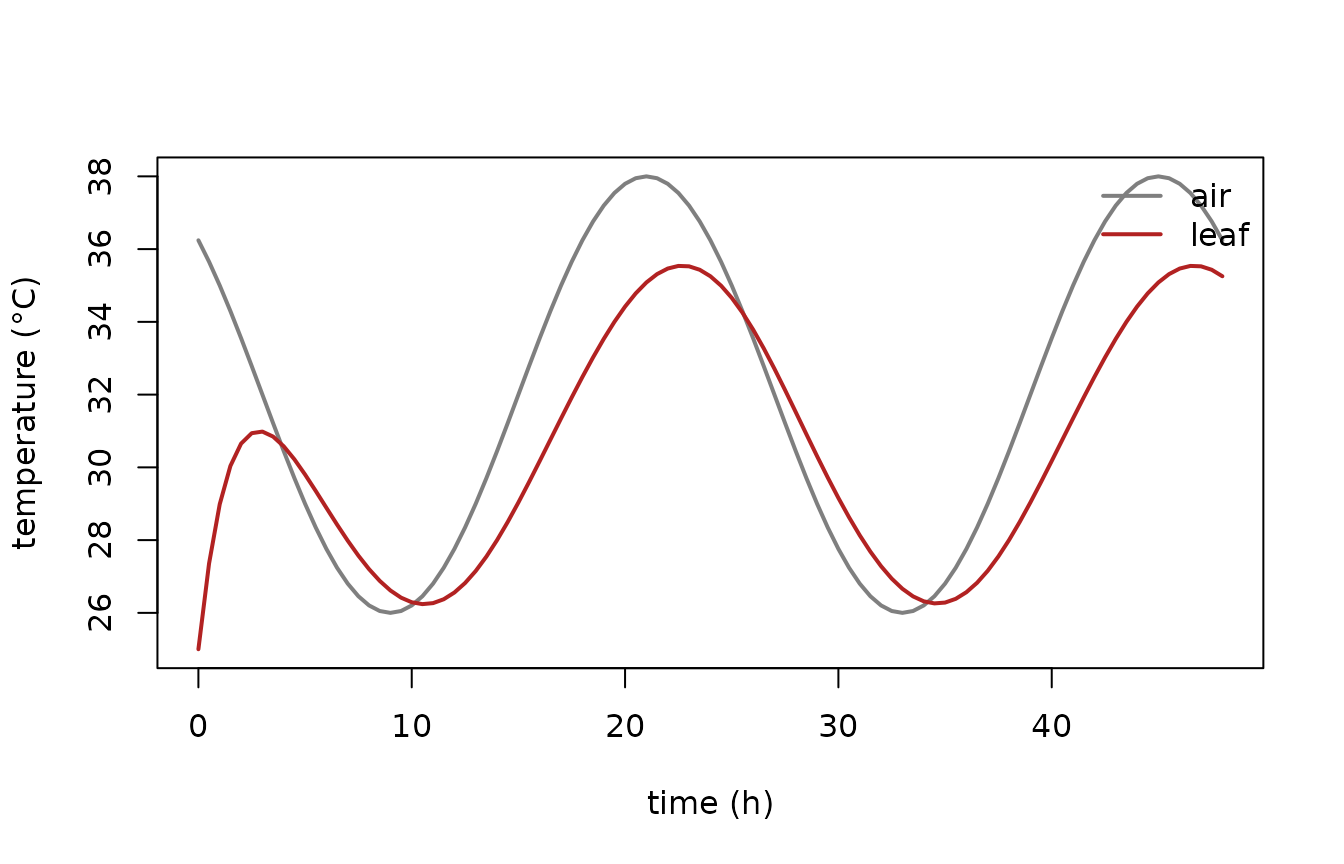
The leaf temperature tracks the air temperature but is buffered by transpirational cooling — exactly the behaviour we expect.
Comparing strategies
Because building and running a system is cheap, comparing parameterisations is just a loop. Here we double the maximum transpiration conductance and re-run:
run_strategy <- function(g_tr_max) {
  pars <- LeafThermalSystemPars()
  pars$g_tr_max <- g_tr_max
  lz <- LeafThermalSystem$new(pars, drivers)
  lz$set_state(c(25), 0)
  runner <- LeafThermalSolver$new(lz$ptr, ctrl$ptr, drivers$ptr)
  runner$advance_adaptive(times)
  runner$history()$T_LC
}

base_g <- LeafThermalSystemPars()$g_tr_max
T_baseline <- run_strategy(base_g)
T_high_cond <- run_strategy(2 * base_g)

plot(times, out$T_air,
  type = "l", col = "grey70", lwd = 2,
  xlab = "time (h)", ylab = "leaf temperature (°C)",
  ylim = range(out$T_air, T_baseline, T_high_cond)
)
lines(times, T_baseline, col = "firebrick", lwd = 2)
lines(times, T_high_cond, col = "steelblue", lwd = 2)
legend("topright",
  legend = c("air", "baseline", "2x conductance"),
  col = c("grey70", "firebrick", "steelblue"), lwd = 2, bty = "n"
)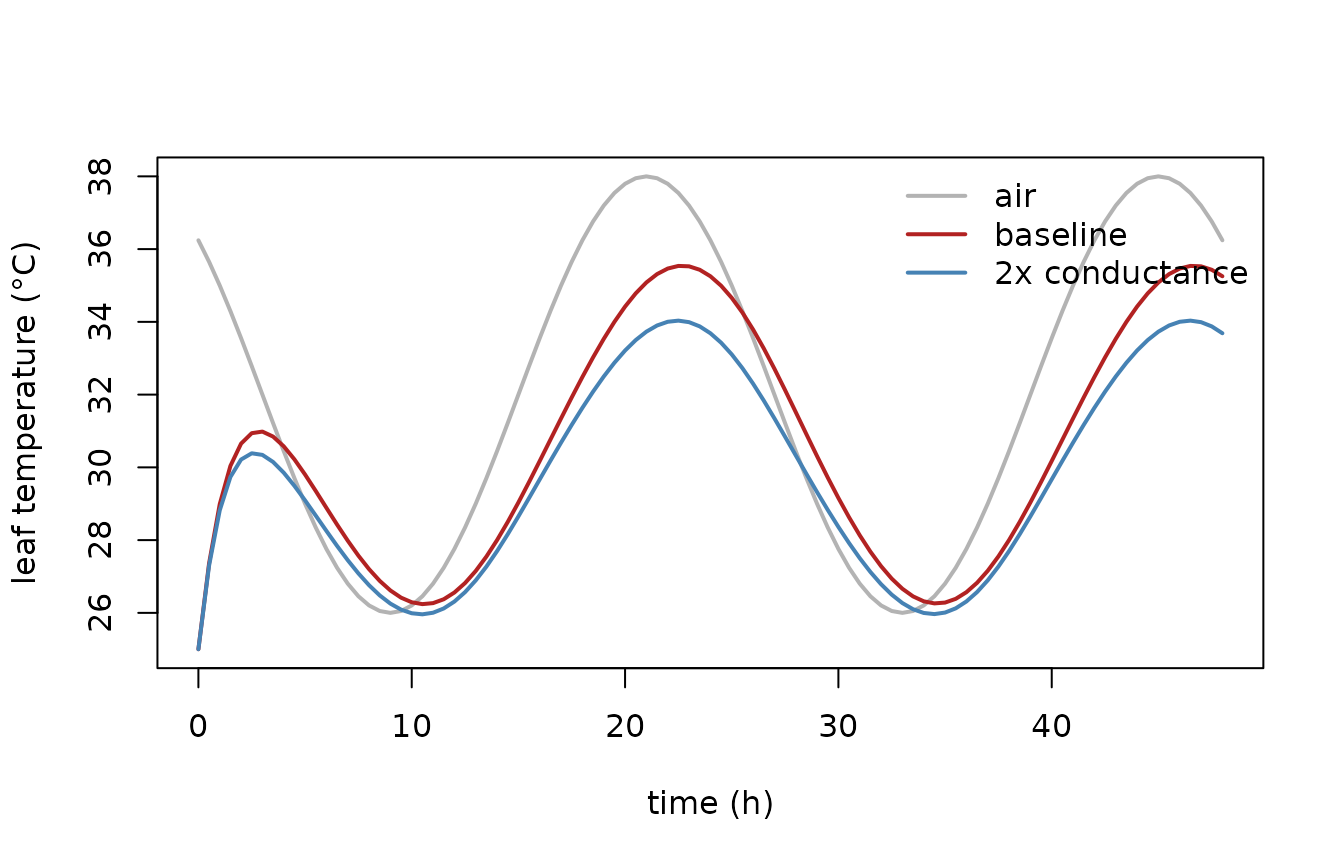
Higher conductance means stronger transpirational cooling, so the leaf stays closer to — or below — air temperature at the hottest part of the day.
Where next
- The full, copy-able sources are in
system.file("examples/leaf_thermal", package = "odelia")— start there when building your own model. - To calibrate a model’s parameters against data using exact gradients, see the parameter-fitting vignette.